

There’s no fixed Google Ads budget that works for every business. A company spending $2,000 a month may generate a steady flow of qualified leads, while another spending $10,000 may struggle to turn clicks into customers. The difference often comes down to factors such as keyword competition, cost per click (CPC), conversion rate, target audience, and customer value.
That makes setting your Google Ads budget less about choosing a monthly number and more about working backward from what you want your campaigns to achieve. If you know how many leads or sales you need, how much you can afford to pay for each one, and what your current conversion rates look like, you can build a budget around those numbers.
In this guide, I’ll break down the factors that should influence your Google Ads budget, how to estimate your starting spend, and how to determine when it makes sense to increase or reduce your investment.
What Is a Realistic Google Ads Budget in 2027?
A realistic Google Ads budget is one that gives your campaign enough room to generate meaningful clicks and conversions without pushing acquisition costs beyond what your business can afford.
Google allows advertisers to choose their own average daily budgets based on their advertising goals and how much they are comfortable spending.
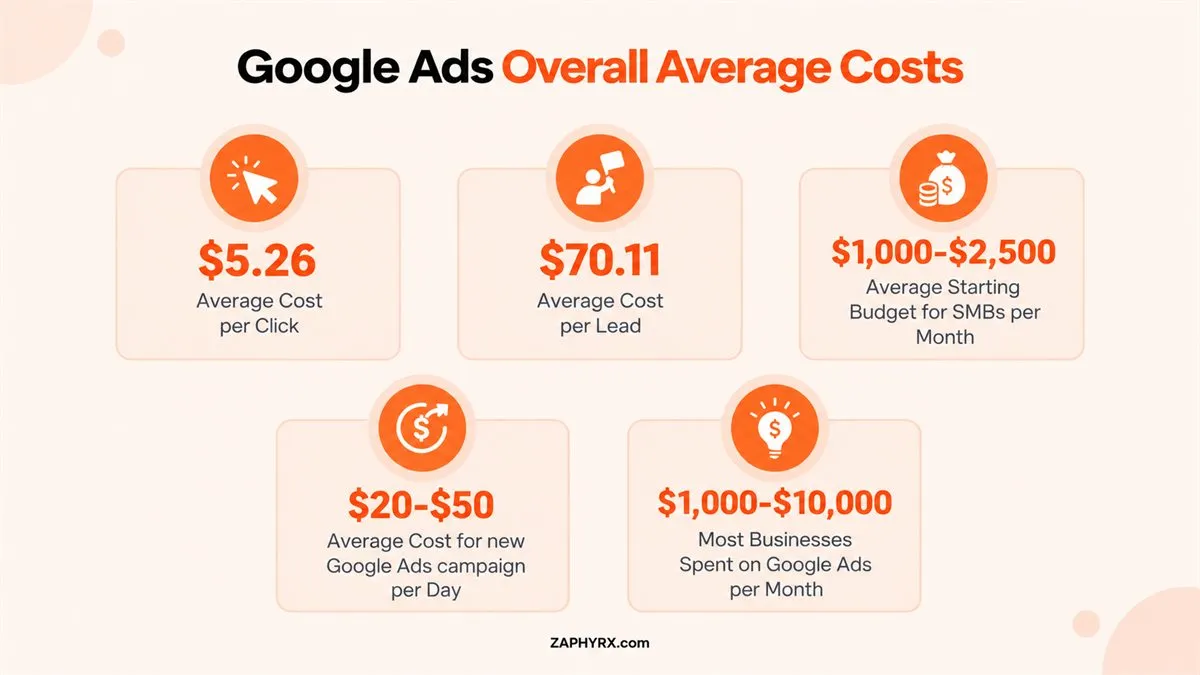
The latest 2026 search advertising benchmarks help show why one recommended budget would not work for every business. WordStream analyzed more than 13,000 U.S.-based campaigns across 23 industries and reported these overall averages:
| Metric | 2026 Search Ads Benchmark |
|---|---|
|
Average click-through rate |
6.64% |
|
Average cost per click |
$5.42 |
|
Average conversion rate |
8.18% |
|
Average cost per lead |
$66.69 |
Those numbers are useful reference points, but they are not targets every advertiser should expect to hit. If your average CPC is $3, a $3,000 budget can theoretically purchase around 1,000 clicks. At an $8 CPC, the same budget buys roughly 375.
Google’s Advertising Business Shows the Scale Behind Paid Search
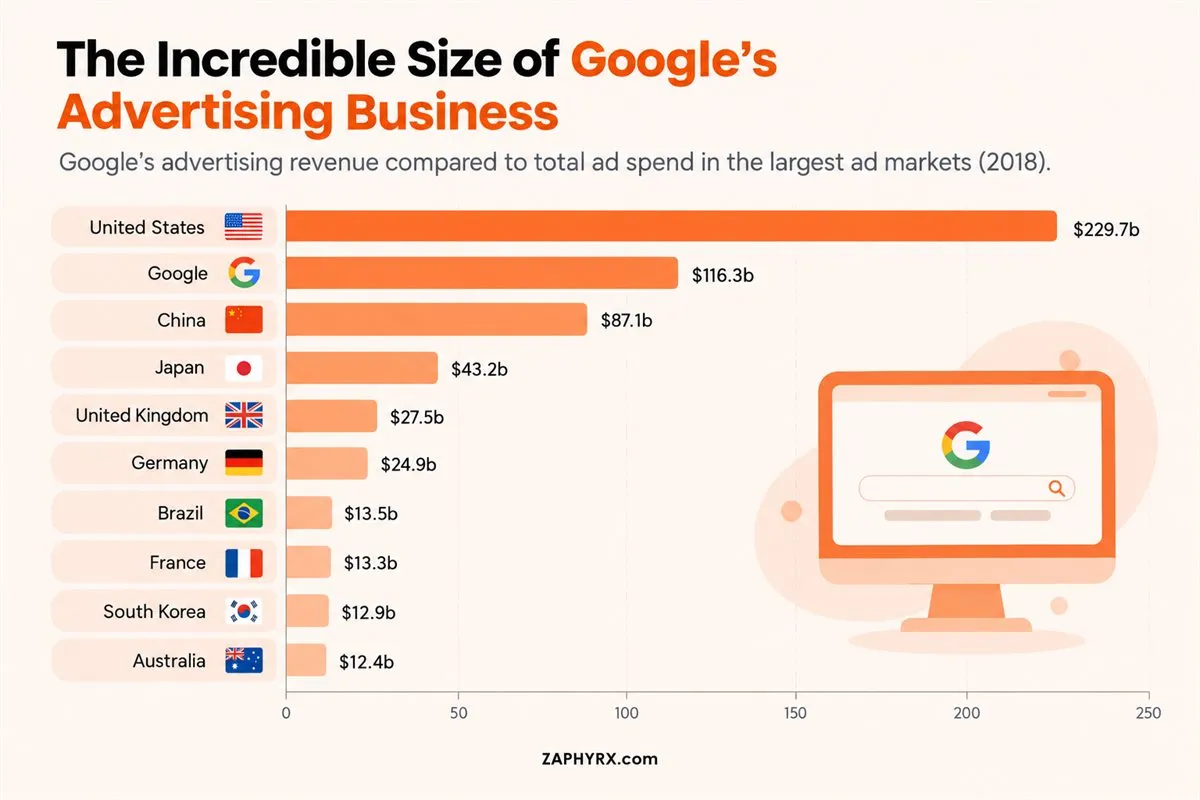
Google has operated at a scale few advertising platforms can match. As this Statista comparison shows, Google generated $116.3 billion in advertising revenue in 2018, a figure larger than the total advertising spend of several major national markets shown in the same chart. Only the United States, at $229.7 billion, was substantially larger in the comparison.
The data is historical, but it helps explain why Google Ads became such a central part of digital advertising strategy. Businesses are competing inside an ecosystem built around enormous advertiser demand, which is why your budget cannot be set in isolation. Market competition, CPCs, audience size, and conversion economics all influence how far your spend can realistically go.
What Determines Your Google Ads Budget?
Your Google Ads budget should reflect the economics of your business and the results you want from your campaigns. Two companies targeting similar audiences can need very different budgets because their keywords, conversion rates, customer values, and sales goals are different.
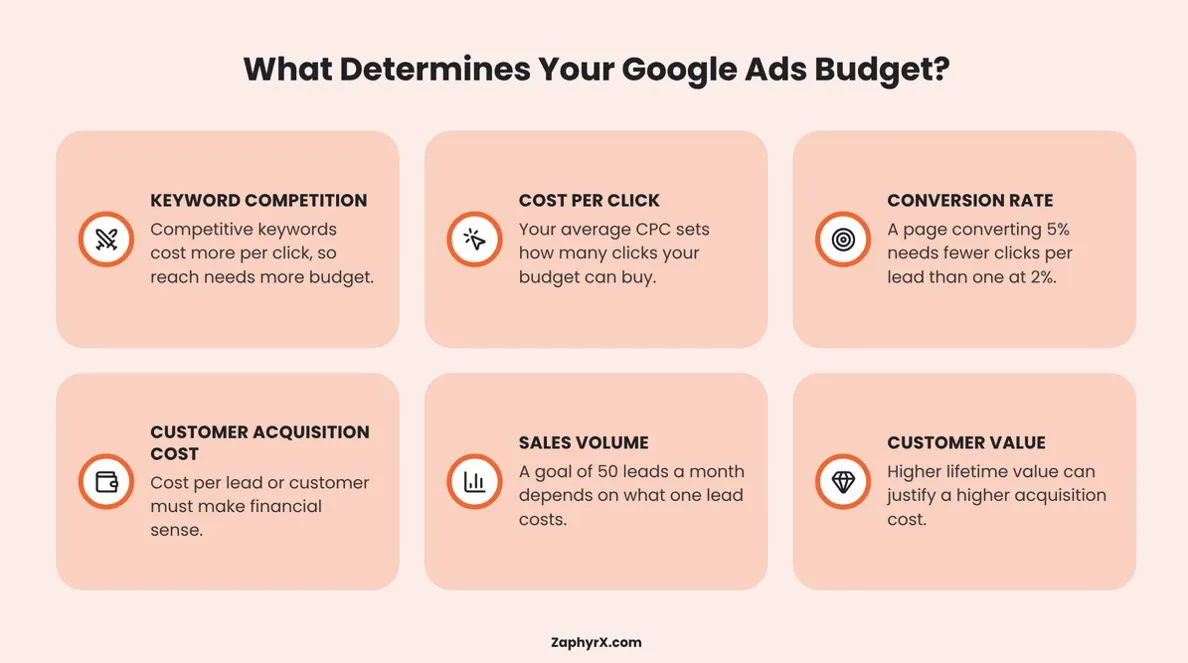
Several factors determine how much you need to invest in Google Ads. Understanding these can help you set a realistic budget based on your business goals and expected returns:
- Keyword Competition: Highly competitive keywords generally have higher advertising costs because multiple businesses are bidding for the same search terms. Targeting these keywords may require a larger budget to generate sufficient traffic.
- Cost Per Click (CPC): Your average CPC determines how many clicks your budget can generate. For example, a $1,000 budget can generate 500 clicks at a $2 CPC but only 100 clicks at a $10 CPC.
- Conversion Rate: Your landing page and overall campaign performance influence how many visitors become leads or customers. A 5% conversion rate generates more leads from the same traffic than a 2% conversion rate.
- Customer Acquisition Cost (CAC): Consider how much your business can afford to spend to acquire a new customer. Your advertising budget should support an acquisition cost that leaves enough room for profit.
- Sales Volume: Your lead generation targets also influence your budget. If you want 50 qualified leads each month, estimate how much you currently spend to generate one qualified lead and use that figure to calculate your required investment.
- Customer Lifetime Value (CLV): Consider how much revenue a customer generates throughout their relationship with your business. Businesses with higher customer lifetime value may be able to justify higher acquisition costs, provided the long-term returns support the investment.
The right starting point, then, is not asking what other companies spend. It is calculating what you need to spend to generate the number of clicks, leads, or sales required to reach your business goal.
How Much Does Google Ads Cost Per Click in 2027?
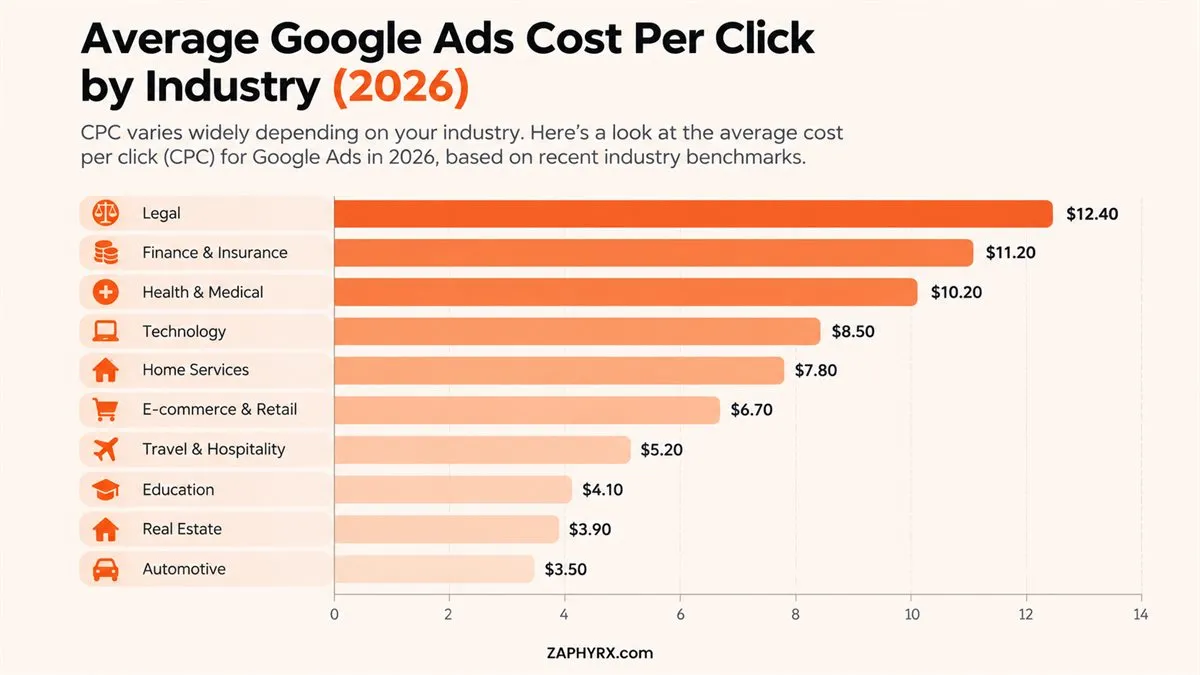
Cost per click (CPC) is one of the first numbers you need to understand when planning your Google Ads budget. It tells you how much you pay, on average, when someone clicks your ad. However, CPC varies considerably depending on your industry, keyword competition, location, campaign type, and bidding strategy.
For example, a business targeting broad informational searches may pay considerably less per click than a company bidding on competitive commercial keywords such as business insurance, legal services, or enterprise software. This is because advertisers are competing for searches with different levels of commercial value.
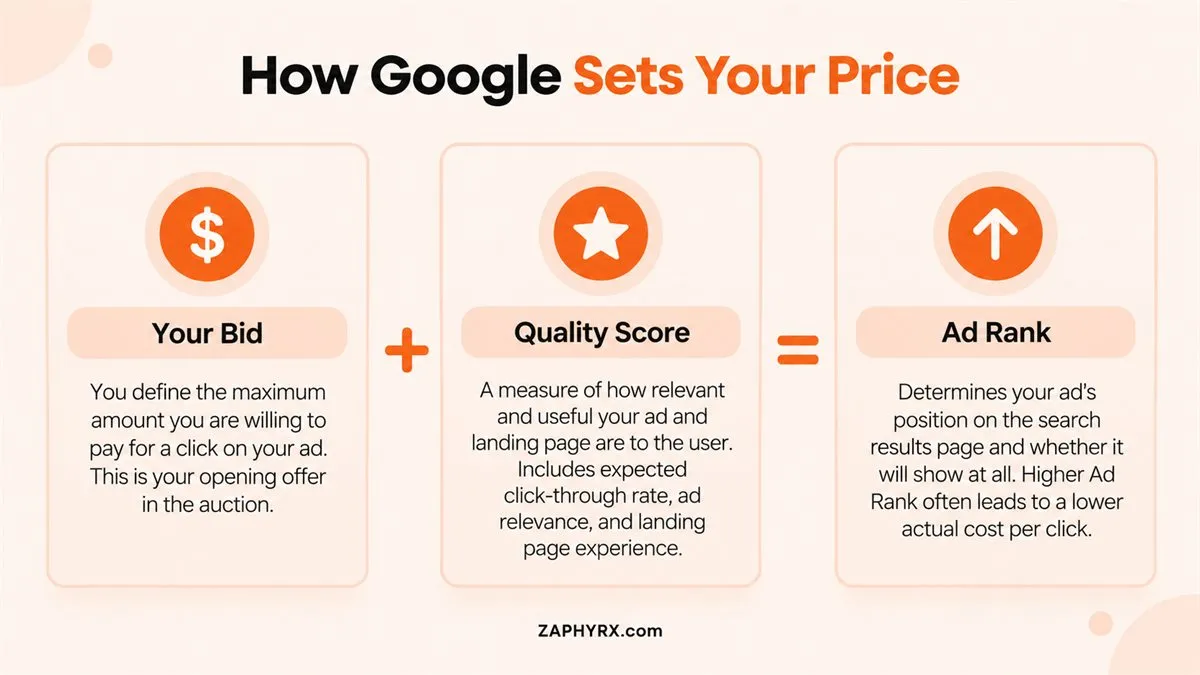
Your actual CPC also depends on factors such as ad quality, landing page relevance, expected click-through rate, and the competition in each individual auction. Google uses Ad Rank to determine which ads appear and where they appear, so the advertiser with the highest bid does not automatically win every auction.
When estimating your budget, avoid relying on a single industry-wide CPC figure. Research the keywords you intend to target, review their estimated costs in Google Keyword Planner, and use those figures to calculate how much traffic your monthly budget can realistically support.
Remember, a lower CPC does not necessarily mean a better campaign. Paying more for a click can make financial sense if those visitors are more likely to become qualified leads or paying customers.
How to Calculate Your Google Ads Budget (With a Practical Example)
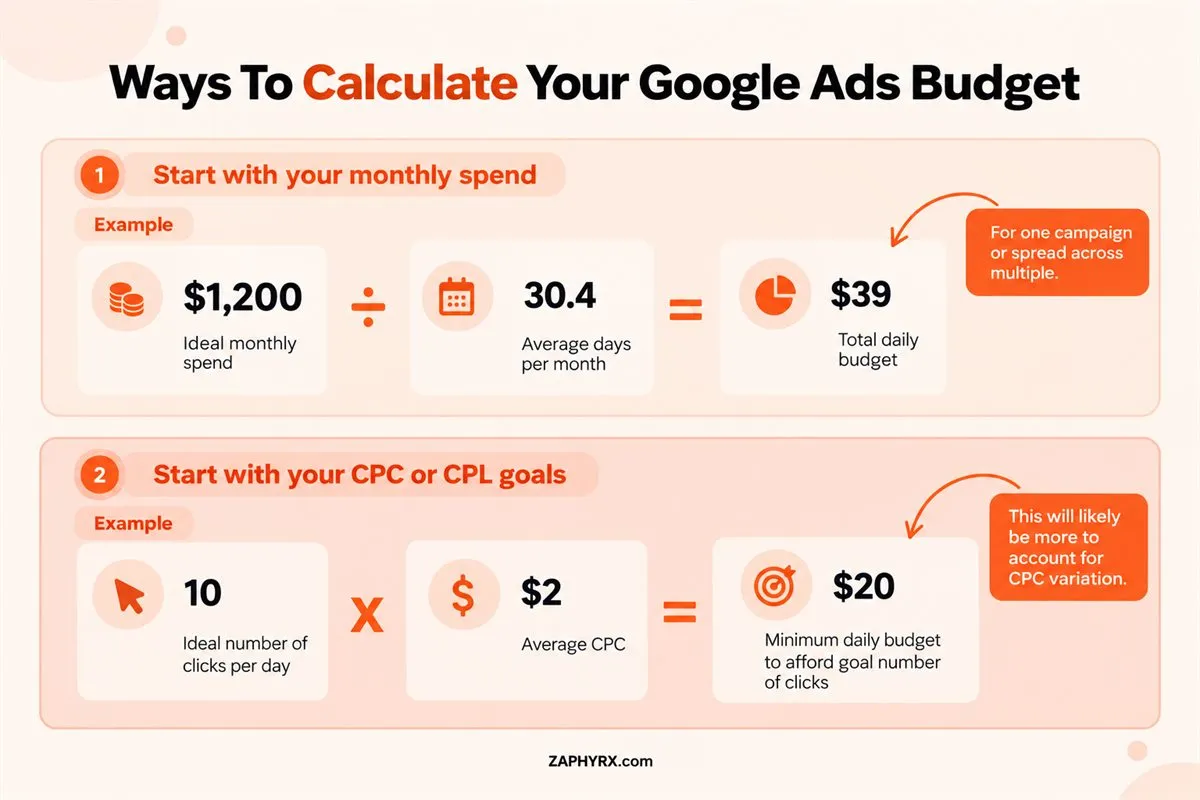
Instead of choosing a monthly Google Ads budget based on what other businesses spend, you can work backward from your lead or sales target. This gives you a more realistic starting point and makes it easier to adjust your budget as campaign data comes in.
The latest overall 2026 search advertising benchmark for cost per lead is $66.69, but your own CPL should be based on your market and sales economics rather than that average alone.
A simple way to estimate your budget is:
Monthly ad budget = Target number of conversions × Cost per conversion
For example, suppose your goal is to generate 30 qualified leads each month and your target cost per lead is $75. Your estimated monthly ad budget would be:
30 leads × $75 = $2,250 per month
You can take the calculation one step further if you do not yet know your cost per conversion. Start with your expected CPC and conversion rate.
Expected cost per conversion = Average CPC ÷ Conversion rate
If your average CPC is $5 and 5% of your ad visitors convert, your estimated cost per conversion would be:
$5 ÷ 0.05 = $100
To generate 30 conversions at that rate, you would need an estimated $3,000 monthly budget.
These are planning estimates, not guaranteed results. Your actual CPC and conversion rate can change as you launch campaigns, target different keywords, adjust bids, and improve your landing pages. That is why your initial Google Ads budget should give you enough room to collect meaningful performance data before making major decisions.
How Much Should You Start With for Google Ads?
Your starting Google Ads budget should be large enough to generate meaningful traffic and conversion data, but it does not need to be your long-term budget. A smaller test budget can make sense when you are entering a new market, testing an offer, or still learning which keywords and audiences convert.
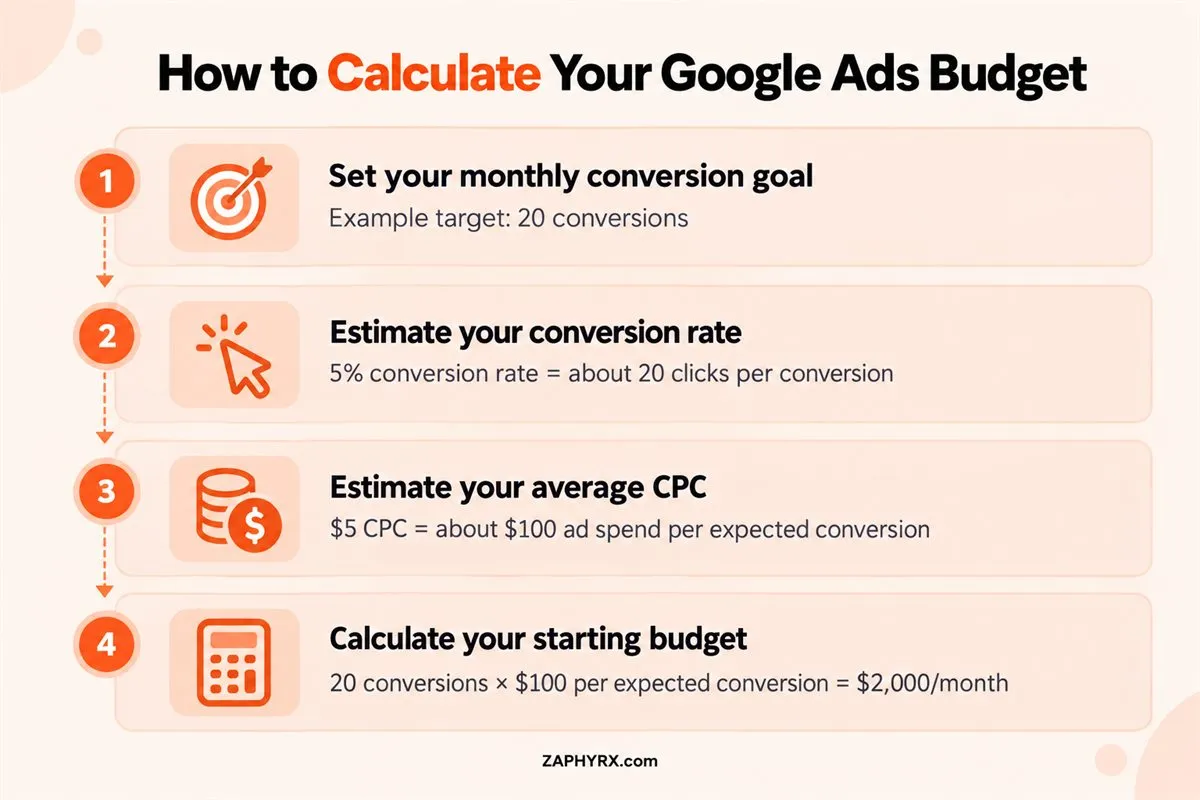
One practical way to set the starting point is to estimate how many clicks you need to generate your target number of conversions. For example, if your expected conversion rate is 5%, you would need roughly 20 clicks to generate one conversion. If your average CPC is $5, that would require about $100 in ad spend per expected conversion.
From there, work backward from your monthly target. If you want 20 conversions at an estimated $100 cost per conversion, your starting budget would be around $2,000 per month.
The important point is that this is a planning estimate. New campaigns can perform above or below your assumptions, particularly when you have limited historical data.
After launch, use actual CPC, conversion rate, cost per conversion, and lead quality to replace your estimates. If the campaign is producing profitable results and there is additional search demand, you can gradually increase spending. If the economics do not work, fix the underlying campaign or landing-page issues before simply adding more budget.
How Much Should Different Businesses Spend on Google Ads?
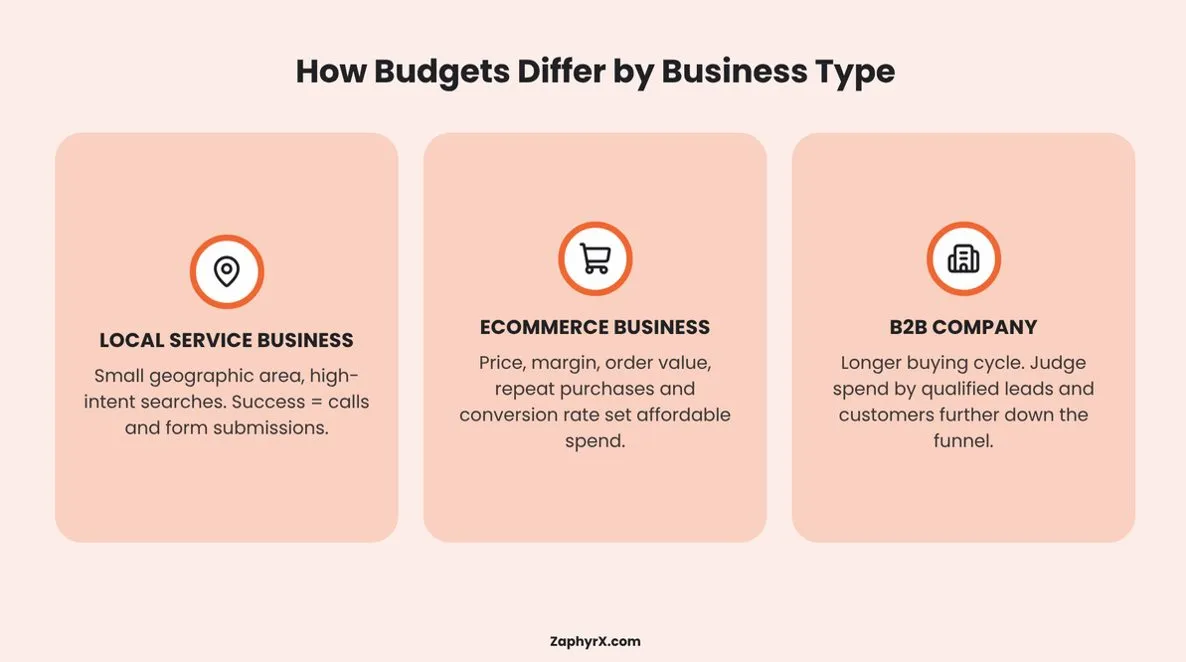
There is no industry-wide budget that guarantees a specific number of leads or sales. A local service business, an ecommerce store, and a B2B company can have very different advertising economics, even when they spend the same amount each month.
For example, a local service business may focus its budget on a small geographic area and a limited group of high-intent searches. Its priority may be generating calls or form submissions from people actively looking for a service.
An ecommerce business has a different calculation. Product price, profit margin, average order value, repeat purchases, and conversion rate all influence how much the business can reasonably spend to acquire a customer.
For B2B companies, the buying cycle is often longer, and a click may not immediately produce a sale. A campaign might generate a form submission that later becomes a sales-qualified lead and eventually a customer. As a result, the budget needs to be evaluated against metrics further down the funnel, not just immediate conversions.
This is why comparing your budget with another company’s monthly spend can be misleading. The more useful question is how much you can spend to acquire a customer while maintaining the return your business requires.
Before setting a fixed 2027 budget, look at your own CPC, conversion rate, cost per acquisition, customer value, and available search demand. Those numbers give you a much stronger basis for deciding how much to invest.
Your Google Ads Budget Depends on Available Search Demand
You can set a target budget, but that does not mean Google Ads will always spend the full amount profitably. Your campaigns are limited by the number of people searching for the products or services you offer, the keywords you target, your location settings, and the level of competition in those auctions.
This matters when you are deciding how aggressively to scale your campaigns. Suppose your current campaigns generate consistent leads, but the keywords you target have limited monthly search volume. Increasing your budget may not produce a proportional increase in conversions because there simply may not be enough relevant searches available.
Google Keyword Planner can help you estimate search volume, competition, and potential keyword costs before you commit to a larger budget. You can use those estimates alongside your historical campaign data to understand the amount of traffic your target market can realistically provide.
Your budget should also account for impression share. If your campaigns are already capturing a large percentage of the available impressions for your most valuable searches, increasing spend may require expanding your keyword set, geographic targeting, or campaign coverage.
The goal is not to spend every dollar available. It is to identify how much qualified search demand exists and determine how much of that demand you can economically capture. This keeps your Google Ads budget connected to actual market opportunity rather than an arbitrary monthly spending target.
How Should Customer Economics Affect Your Google Ads Budget?
The amount you need to spend and the amount you can profitably afford to spend are not always the same. This is where your sales data becomes important.
Suppose your campaign generates 100 leads. Of those:
- 30 become qualified opportunities
- 20% of those opportunities close
- That produces 6 customers
If you spent $6,000 generating those leads, your acquisition cost is:
$6,000 ÷ 6 = $1,000 per customer
Is that good?
You cannot answer until you know what those customers are worth.
If each customer generates $15,000 in gross profit over their relationship with your business, a $1,000 acquisition cost may be attractive. If each produces $1,200, the economics look very different.
This is why a serious Google Ads budget should connect:
Spend → Clicks → Leads → Qualified Opportunities → Customers → Revenue
The further you can trace paid search through that chain, the easier it becomes to decide whether your budget should grow.
A low CPL is not automatically good if the leads rarely qualify. A high CPL is not automatically bad if those leads consistently become high-value customers.
The business outcome matters more than the isolated advertising metric.
How Do Google Ads Daily and Monthly Budgets Work?
Google Ads generally asks you to set an average daily budget for each campaign rather than entering a standard monthly budget. If you know how much you want to spend monthly, Google recommends dividing that amount by 30.4, the average number of days in a month.
For example:
$3,040 monthly budget ÷ 30.4 = $100 average daily budget
That does not mean Google will spend exactly $100 every day.
For most campaigns, Google can spend up to two times your average daily budget on a particular day when it expects more traffic or conversion potential. However, the monthly spending limit for most campaigns is 30.4 times the average daily budget.
Using the same example:
| Budget Rule | Amount |
|---|---|
|
Average daily budget |
$100 |
|
Possible daily spending limit |
$200 |
|
Monthly spending limit |
$3,040 |
So if you notice a campaign spending more than its stated daily budget on a particular day, that does not necessarily mean something is wrong.
Google is pacing spend across the month. This distinction is important when planning cash flow and comparing actual spend against your budget.
When Should You Increase Your Google Ads Budget?
Increasing your Google Ads budget makes sense when your campaigns are already producing results that meet your business targets and there is enough additional demand to support more spending. Simply increasing the daily budget because a campaign is performing well can lead to higher costs without producing the same quality of results.
Look at several metrics before increasing spend:
- Conversion volume: Are you consistently generating the number of leads or sales you need?
- Cost per conversion: Is your cost per lead or customer within the range your business can support?
- Conversion quality: Are the conversions turning into qualified opportunities and customers?
- Impression share: Are you losing relevant impressions because of your budget?
- Search demand: Is there enough additional demand for your target keywords to support more traffic?
- Revenue or customer value: Are the customers generated through paid search producing enough value to justify additional acquisition costs?
If these numbers remain healthy, increase your budget gradually and monitor what happens to CPC, conversion rate, cost per conversion, and lead quality.
You should also distinguish between budget constraints and campaign problems. If a campaign has a poor conversion rate or attracts irrelevant traffic, giving it more money will not necessarily solve the underlying issue. Improve targeting, ads, keywords, bidding, or landing pages first. A larger budget should follow proven performance and available demand, not replace campaign optimization.
When Should You Avoid Increasing Your Google Ads Budget?
A larger budget does not repair a weak campaign. It usually gives the same campaign more money to continue doing what it is already doing.
If the underlying economics are poor, that can simply scale the problem. Hold or reduce spend when:
- conversion tracking is unreliable;
- search terms are attracting the wrong audience;
- landing pages convert poorly;
- leads consistently fail qualification;
- cost per acquisition exceeds your acceptable threshold;
- campaigns lack enough data to support a scaling decision;
- your sales team cannot properly handle additional inquiries.
Think about a campaign producing leads at $180 each when the business can only afford $100. Doubling its budget does not automatically bring the CPL down.
You may first need to improve targeting, search terms, creative, bidding, landing pages, or conversion tracking. The same logic applies to traffic.
If paid visitors are reaching the website but leaving without taking meaningful action, increasing traffic should not be your first response. Fix the path from click to conversion before paying for substantially more clicks.
How to Know If Your Google Ads Budget Is Working
Your Google Ads budget is only useful if the results it produces make financial sense for your business. That means looking beyond clicks and impressions and measuring what happens after someone interacts with your ad.
Start with cost per conversion. If you spend $3,000 and generate 30 qualified leads, your average cost per lead is $100. That number gives you a starting point for comparing acquisition costs against the value of those leads.
For businesses that can track sales, go further and calculate customer acquisition cost (CAC). If your campaigns generate customers, compare the cost of acquiring those customers with their revenue and, ideally, their gross profit or customer lifetime value.
You should also track the quality of your conversions. Ten low-quality leads are not necessarily more valuable than five leads that closely match your ideal customer profile and regularly become sales opportunities.
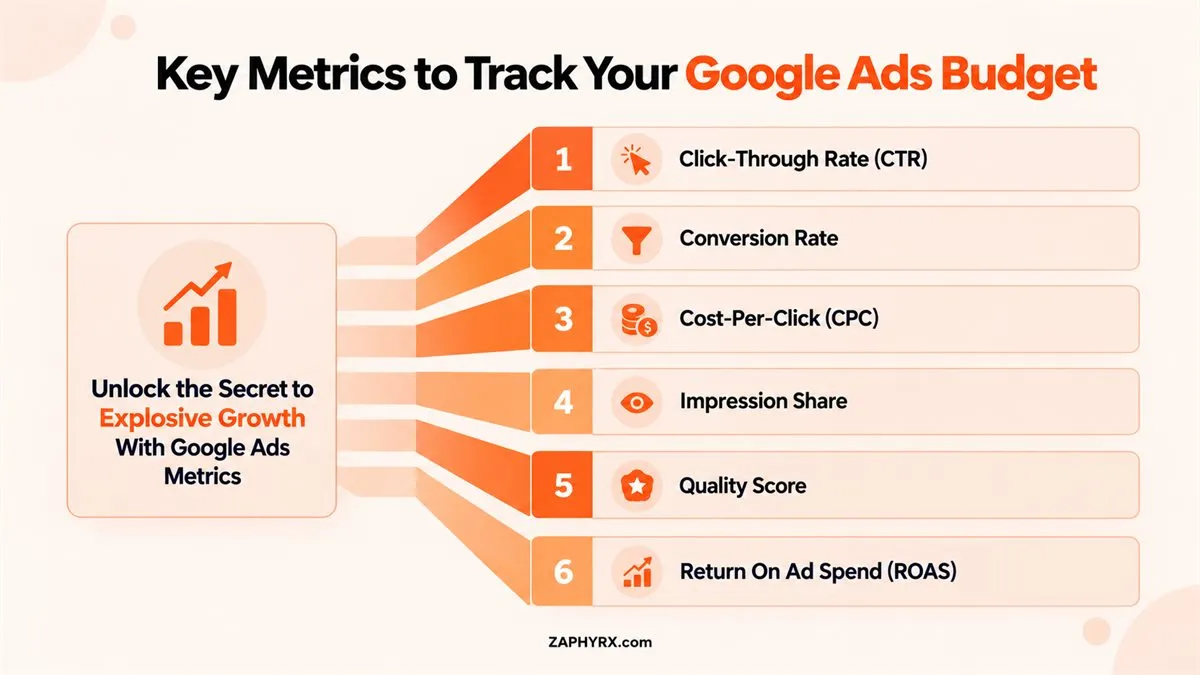
Your reporting should connect advertising activity with business outcomes. Depending on your business model, useful metrics can include:
- Click-through rate (CTR)
- Conversion rate
- Cost per lead or sale
- Qualified lead rate
- Customer acquisition cost
- Revenue generated
- Return on ad spend (ROAS)
These metrics help you determine whether your current budget is supporting profitable growth, needs optimization, or should be adjusted to reflect changing campaign performance.
Common Google Ads Budgeting Mistakes to Avoid
A poorly planned Google Ads budget can limit performance before you have enough data to understand what is working. Some budgeting mistakes are especially common when businesses focus on spending levels rather than the economics behind their campaigns.
Setting a Budget Based on Competitors
Another company’s monthly ad spend tells you very little about what your business should spend. Their CPCs, conversion rates, customer value, geographic targeting, and sales goals may be completely different.
Focusing Only on Clicks
A campaign can generate inexpensive traffic without producing qualified leads or sales. Your budget should be evaluated against meaningful conversions and the value those conversions create.
Spending More to Fix Poor Performance
Increasing spend will not automatically fix irrelevant keywords, weak ads, or a landing page that fails to convert visitors. Identify the performance issue before putting more money behind the campaign.
Ignoring Conversion Tracking
Without reliable conversion tracking, it becomes difficult to know which campaigns and keywords are actually producing results. Your budget decisions then rely on incomplete information.
Making Changes Too Quickly
Campaign performance can fluctuate, particularly when you have limited historical data. Constantly changing budgets, targeting, or bidding settings can make it harder to determine what is actually driving results.
Treating the Budget as a Fixed Number
Your Google Ads budget should evolve as your campaign data, business goals, search demand, and acquisition economics change. A budget that worked six months ago may not produce the same results today.
The better approach is to treat your budget as a working financial model: set assumptions, measure actual performance, identify gaps, and adjust your spending based on the evidence.
Build a Google Ads Budget You Can Scale
Your Google Ads budget should give you enough room to compete for relevant searches, generate useful conversion data, and reach the customers your business actually wants. The right number will depend on your CPCs, conversion rate, customer acquisition cost, sales targets, and the amount of search demand available in your market.
Start with realistic assumptions, set a budget around your desired results, and use actual campaign data to refine those assumptions over time. Track more than clicks. Look at qualified leads, customers, revenue, and the cost of acquiring each customer. This gives you a clearer picture of what your advertising spend is actually producing.
You also do not need to commit to a large budget from day one. A controlled starting budget can help you test your keywords, messaging, targeting, and landing pages before you decide how aggressively to scale.
Most importantly, treat your Google Ads budget as a business decision rather than simply an advertising expense. When your campaigns consistently produce valuable customers at an acquisition cost your business can support, you have a stronger foundation for increasing spend.
Ready to Build a Google Ads Budget That Scales?
If you need help determining where your Google Ads budget should start or how to structure your campaigns around your business goals, ZAPHYRX can help. Explore our PPC management services or schedule a consultation to discuss your paid search strategy.
Frequently Asked Questions
Yes. A smaller budget can be used to test specific keywords, locations, products, or services. The available budget will determine how much traffic and conversion data you can collect.
Google does not require one universal minimum monthly advertising budget. Advertisers set an average daily budget for their campaigns based on their goals and spending preferences.
Not necessarily. Different campaigns can have different objectives, audiences, keyword costs, and performance levels. Separating campaigns can give you greater control over how your budget is allocated.
There is no fixed number of days that applies to every campaign. You need enough relevant data to identify a meaningful performance pattern. The required timeframe depends on traffic volume, conversion volume, and the type of campaign.
Google Ads uses an average daily budget, so daily spending can vary. Google may spend more than your average daily budget on some days when additional traffic opportunities are available, while balancing spending over the applicable monthly period.
Not automatically. Budget can affect how often your ads are eligible to enter auctions, but ad position also depends on factors such as Ad Rank, bid, ad quality, competition, and the context of the search.
If you work with an external provider, separate advertising spend from management fees when planning your total marketing budget. This makes it easier to see how much money is going directly toward media spend versus campaign management.
Yes. Search volume and competition can change during holidays, seasonal buying periods, promotions, or other demand fluctuations. Reviewing historical performance and upcoming demand can help you plan budget changes around those periods.