
A website can look polished and still be difficult to use. When pages are grouped poorly, menu labels feel unclear, or important information sits several confusing steps away, visitors have to work harder to accomplish even simple tasks.
I’ve seen this happen when teams focus on visual design before deciding how the website’s information should be organized. Information architecture fixes that underlying issue by creating a logical structure for content, navigation, labels, and page relationships.
Strong information architecture improves website user experience by helping visitors understand where they are, predict where information will be, and move toward their goals with less effort. It also gives designers, developers, and marketers a clearer foundation for improving navigation, website speed, and search performance over time.
This guide explains how information architecture works, why it matters, and how to build a website structure that supports both users and business growth.
Key Takeaways
- Information architecture organizes website content so users can find, understand, and navigate it more easily.
- A sitemap represents part of the structure, but it is not the complete information architecture.
- Clear labels, logical categories, predictable navigation, search, and internal links work together to improve website usability.
- Card sorting, tree testing, and usability testing help validate information architecture before development.
- Good information architecture supports both user experience and SEO by strengthening page relationships, crawlability, and internal linking.
- The structure should be reviewed as the website, audience, products, and content library grow.
What Is Website Information Architecture?
Website information architecture is the system used to organize, structure, label, connect, and present content so people can find what they need. It determines how pages are grouped, how categories relate, what navigation labels say, and which paths users can follow.
Nielsen Norman Group defines information architecture as both the practice of organizing and maintaining content and the resulting structure, terminology, and navigation of a website. Its primary goal is to make information findable and discoverable.
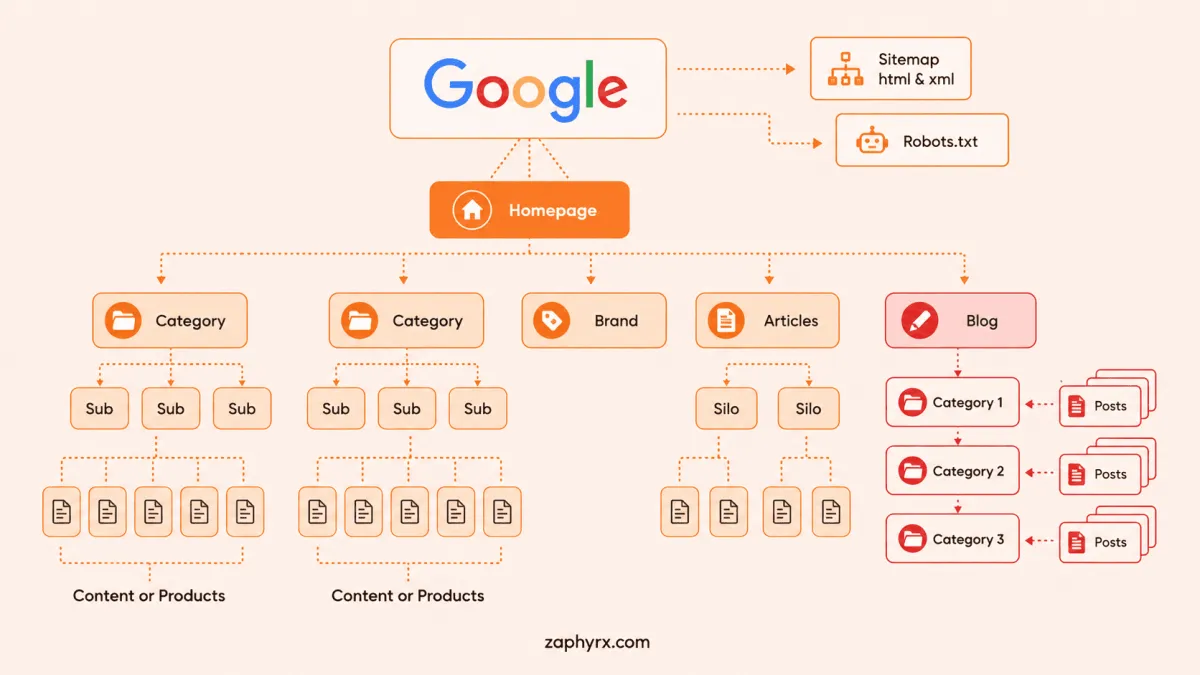
A website’s information architecture includes:
- The overall website hierarchy
- Main and secondary navigation
- Page categories and subcategories
- Menu and link labels
- Content relationships
- Taxonomies and tags
- Breadcrumbs
- Search systems
- Filters and sorting options
- Internal links
- URL relationships
- Rules for adding future content
How Does Information Architecture Improve Website User Experience?
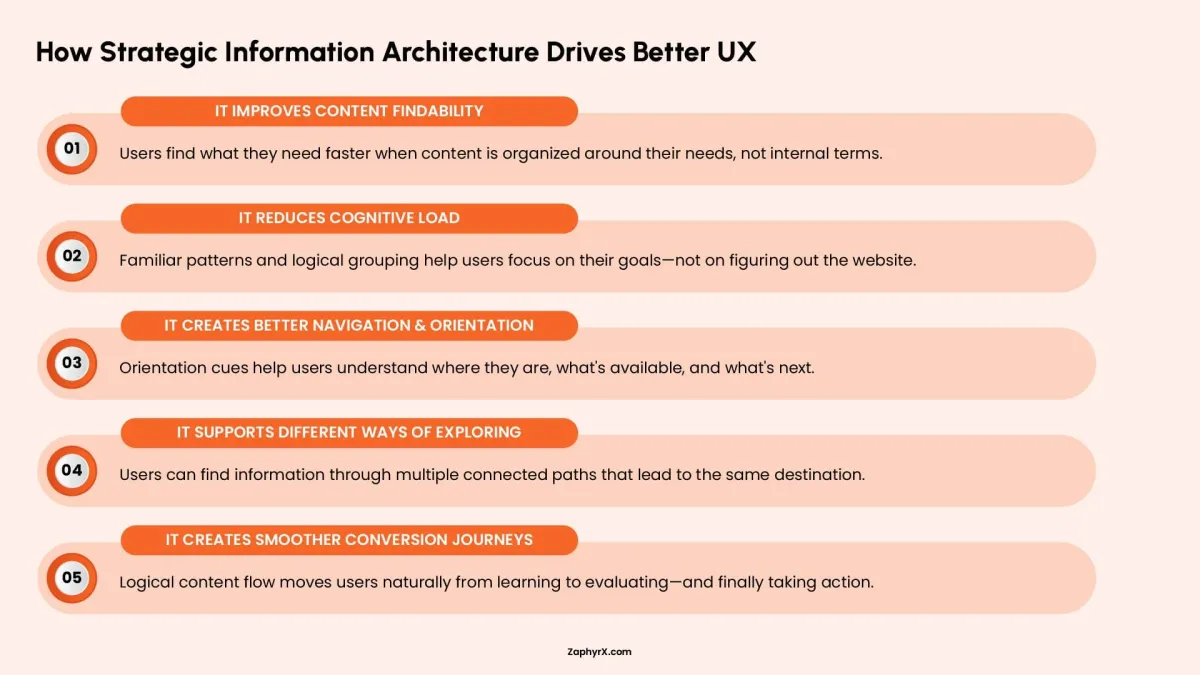
Information architecture improves website user experience by reducing the effort required to understand and use a website. It creates clearer paths, more predictable navigation, stronger orientation cues, and labels that reflect how users think rather than how the company is organized internally.
Baymard’s 2025 ecommerce benchmark found that 58% of desktop sites and 67% of mobile sites had mediocre-to-poor homepage and category navigation experiences. Its research included more than 16,000 navigation performance scores across major US and European websites.
It Improves Content Findability
The primary purpose of information architecture is to make content easier to discover. Users should not have to decode internal business terminology or explore multiple sections before finding relevant information.
Compare these two navigation structures:
User-focused structure:
- Services
- Web Development
- Mobile App Development
- UI/UX Design
- Digital Marketing
Company-focused structure:
- What We Do
- Build
- Transform
- Accelerate
- Innovate
The second example may sound more creative, but it creates additional work for visitors because they must interpret what each category means. Clear labels reduce hesitation and help users make faster decisions.
It Reduces Cognitive Load
Every time users encounter unclear labels, duplicate categories, or unexpected page relationships, they must spend mental effort figuring out the website instead of focusing on their goal.
Effective information architecture reduces this cognitive load by creating familiar patterns. Related content stays together, terminology remains consistent, and users can predict where they will find information. The goal is not to remove all choices. It is to make choices easier to understand.
It Creates Better Navigation and Orientation
A good website structure helps users maintain context throughout their journey. At any point, visitors should understand where they are, what information is available, and what options they have next. Navigation elements such as menus, breadcrumbs, page headings, category labels, and descriptive URLs provide these orientation signals.
For example, a user viewing:
Home → Services → Web Development → Ecommerce Development
immediately understands both the current page and its relationship to the wider website.
W3C guidance recommends consistent navigation mechanisms across pages and supports providing multiple ways for users to locate information, including navigation menus, search, and structural cues.
It Supports Different Ways of Exploring a Website
Not every visitor uses a website in the same way. Some users prefer browsing through navigation menus, while others immediately use search. Some arrive through search engines and enter directly on a deeper page without seeing the homepage.
Strong information architecture supports these different behaviors by creating multiple connected paths to important content. A visitor might discover a service through:
- Main navigation
- Site search
- Internal links
- Breadcrumbs
- Related content sections
Each path should lead to the same clear understanding of the website structure.
It Creates Smoother Conversion Journeys
Information architecture also influences whether visitors move from interest to action.A potential customer may need to understand:
Their problem → Available solution → Proof of expertise → Process → Next step
If these elements are scattered across unrelated pages, users may leave before they understand the offering. When content is logically connected, visitors can move naturally from learning to evaluating and finally taking action. Good information architecture does not simply help users find pages. It helps them make decisions.
What Are the Main Components of Information Architecture?
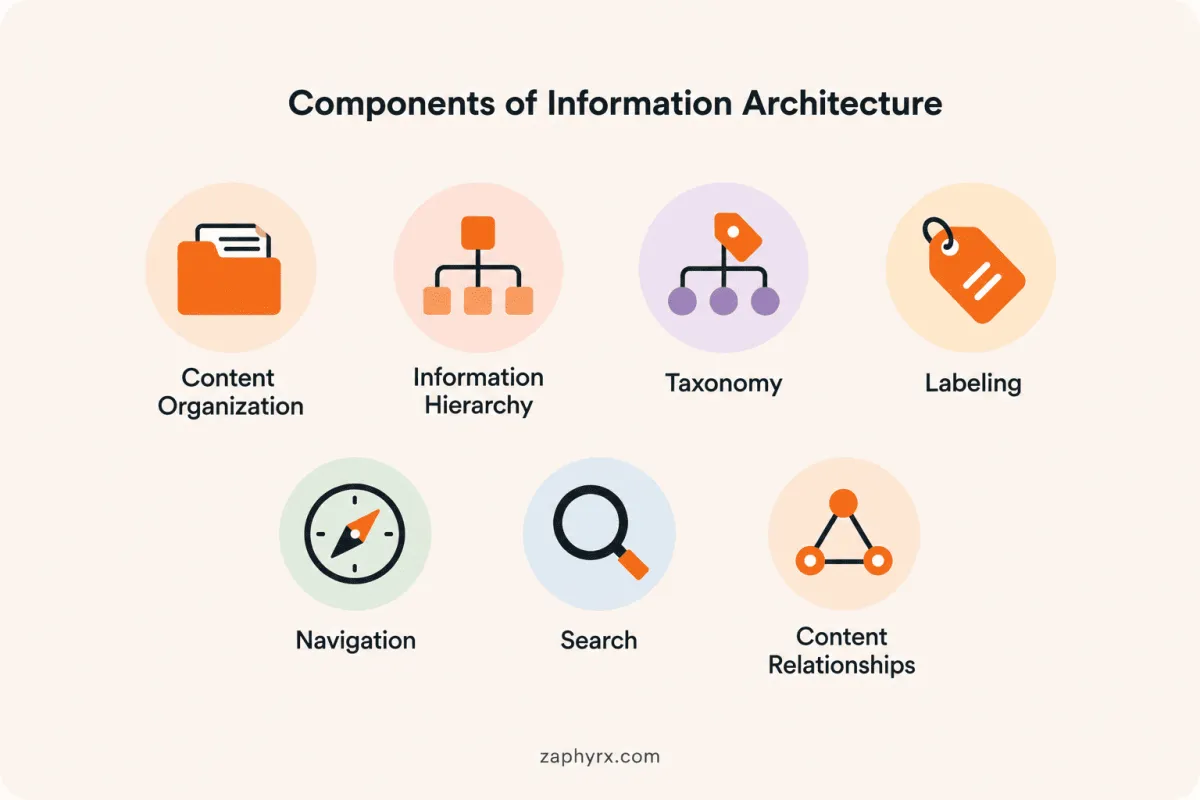
The main components of information architecture include content organization, hierarchy, taxonomy, labeling, navigation, search, and content relationships. Each component solves a different user problem, but they work together to create a website structure that is easier to understand and use.
1. Content Organization
Content organization defines how information is grouped across a website. The goal is to place related content together in a way that matches user expectations. Websites may organize content by topic, product, service, audience, industry, location, customer journey stage, or content type. The right approach depends on what users are trying to accomplish.
For example, a healthcare software development company may organize its main navigation around solutions and industries, while its resource center may focus on topics such as compliance, patient management, and software trends.
Using multiple organization systems is not a problem when each has a clear purpose. Issues occur when similar content appears under competing categories, making it difficult for users to know where information belongs.
2. Information Hierarchy
Information hierarchy defines the relationship between broad categories and specific pages. It helps users understand which information is most important and how different sections connect. A strong hierarchy prevents important pages from being buried too deeply while avoiding overly flat structures where every page appears equally important. The goal is not simply reducing the number of clicks. It is making each navigation decision clear and meaningful.
3. Taxonomy
Taxonomy is the system used to classify and organize content through categories, attributes, and tags. For example, an ecommerce website may classify products by type, brand, size, material, and price range. A B2B website may organize content around services, industries, business challenges, technologies, and content formats.
A well-designed taxonomy improves navigation, filtering, search, internal linking, and reporting. Consistency is especially important. Categories such as “Web Apps,” “Web Applications,” and “Application Development” may appear different but often represent the same concept. Without a controlled taxonomy, users and teams can struggle to find and manage content effectively.
4. Labeling
Labels are the words used throughout a website, including navigation menus, page titles, buttons, and category names. Effective labels are clear, familiar, specific, and consistent. They should help users understand what they will find before clicking.
For example, “UI/UX Design Services” communicates a clear offering, while a vague label like “Create” requires users to guess its meaning. Good labeling also requires understanding the audience’s language. Internal company terms, department names, or product terminology may make sense to employees but confuse new visitors.
5. Navigation
Navigation is the visible system that allows users to move through the website. It includes elements such as menus, breadcrumbs, internal links, search, filters, and footer navigation.
Information architecture and navigation are closely connected but serve different purposes. Information architecture defines how content is structured behind the scenes, while navigation presents that structure to users. A website can have attractive navigation but still fail if the underlying information architecture is unclear.
6. Search
Search provides users with a direct way to find information, especially when they know what they are looking for. However, search should support good architecture rather than replace it. Users may not know the exact terminology used by a website, and poor search results can create frustration.
An effective search experience should understand variations in language, handle synonyms and common mistakes, provide suggestions, support filtering, and guide users when no direct result exists. Baymard’s ecommerce search research found that many websites still struggle to support user search behavior, showing that search remains a major area for UX improvement.
7. Content Relationships
Content relationships define how different pages connect with each other. These connections help users continue their journey and understand related information. For example, a web development service page may connect to relevant case studies, technology pages, industry solutions, process information, and consultation pages.
Strong content relationships improve usability by helping visitors discover relevant information while also creating clearer signals about how website content is connected. Together, these components create the foundation of an effective information architecture system, one that helps users find information, understand options, and complete their goals with less effort.
Information Architecture vs. Sitemap, Navigation, and User Flow
Information architecture, sitemaps, navigation, and user flows describe different aspects of a website. Treating them as interchangeable can result in incomplete planning.
| Concept | What It Represents | Primary Purpose |
|---|---|---|
|
Information architecture |
The complete system for organizing, labeling, connecting, and maintaining information |
Make content understandable, findable, and scalable |
|
Sitemap |
A visual representation of pages and their hierarchical relationships |
Communicate and plan website structure |
|
Navigation |
The visible menus, links, breadcrumbs, and controls users interact with |
Help users move through the website |
|
User flow |
The sequence of steps a user follows to complete one task |
Optimize a specific journey or conversion |
|
Wireframe |
A page-level representation of layout and content priority |
Plan how information appears on individual screens |
How Do You Create an Information Architecture Strategy?
Creating an effective information architecture strategy requires more than organizing pages into menus. It involves understanding business objectives, user expectations, existing content, and how people naturally search for information.
A practical IA process typically includes the following steps:
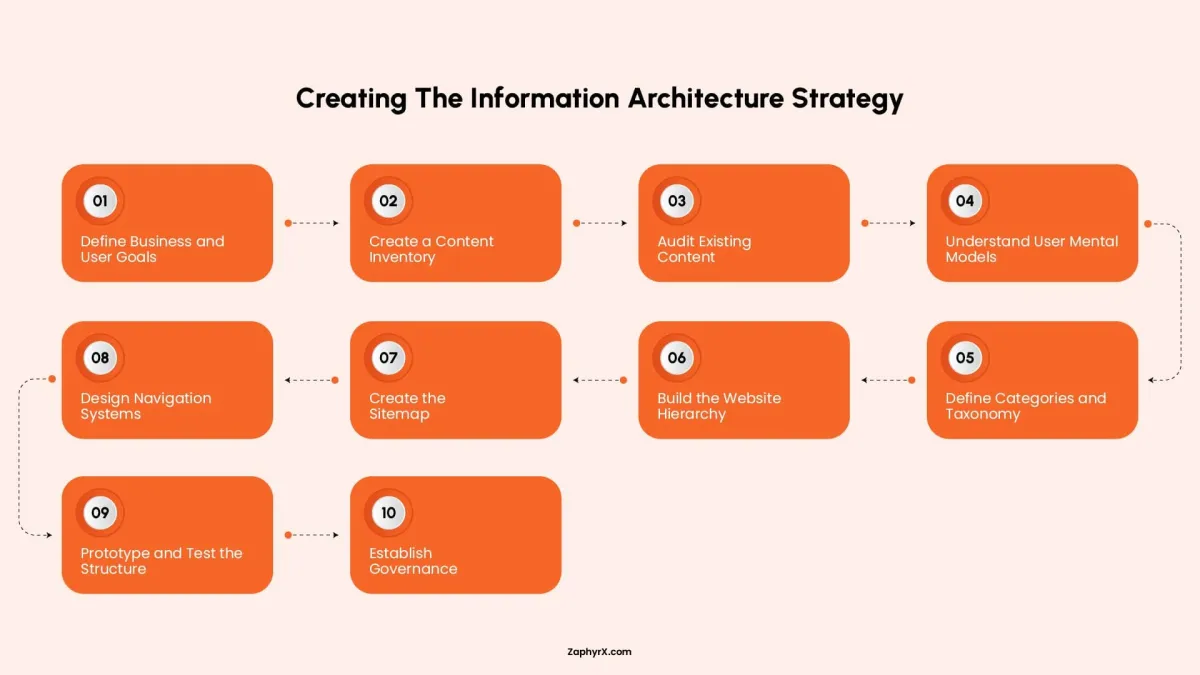
Step 1: Define Business and User Goals
Start by identifying what the website needs to achieve for the business and what users need to accomplish. Business goals may include generating qualified leads, supporting customers, selling products, explaining complex services, building authority, or recruiting employees. User goals may include finding information quickly, comparing options, solving a problem, or completing an action. Strong information architecture connects these goals instead of prioritizing one over the other.
Step 2: Create a Content Inventory
Before changing a website structure, understand what already exists. A content inventory documents important information about current pages, such as URLs, page titles, content types, audiences, traffic, conversions, ownership, and update history. This process reveals duplicate content, outdated sections, missing information, orphaned pages, and areas where multiple pages compete for the same purpose.
Step 3: Audit Existing Content
A content audit determines what should happen to each existing page. Some content may need to be retained, updated, consolidated, redirected, reorganized, or removed. A redesign should not simply transfer every existing page into a new structure. It is an opportunity to improve the overall content system.
Step 4: Understand User Mental Models
Users do not always organize information the same way companies do. For example, an internal team may separate “Cloud Infrastructure” and “Managed IT,” while customers may expect both topics under a broader category such as “IT Services.”
Research methods such as card sorting help reveal how users naturally group information, while tree testing helps evaluate whether a proposed structure allows users to find important content.
Step 5: Define Categories and Taxonomy
After understanding user expectations, create a controlled system for organizing content. Each category should have a clear purpose, use familiar language, remain distinct from other categories, and provide enough value to justify its existence. Avoid vague categories such as “Other” or “General” because they usually indicate unclear content relationships.
Step 6: Build the Website Hierarchy
The hierarchy defines how pages relate to each other and how information moves from broad topics to specific details. Decide which pages belong in the main navigation, which require supporting pages, where internal links should connect related content, and which pages serve as conversion points. The goal is not to force every page into the fewest possible clicks. A clear path with more steps is often better than a shorter but confusing journey.
Step 7: Create the Sitemap
A sitemap turns the planned hierarchy into a visual structure. It shows page relationships, category levels, important landing pages, conversion pages, and planned additions or removals. Keep the sitemap focused on structure. Detailed information about content ownership, keywords, or performance metrics can remain in separate documentation.
Step 8: Design Navigation Systems
Once the structure is defined, determine how users will access it through navigation. This may include the main menu, mobile navigation, breadcrumbs, internal links, search, filters, related-content sections, and footer navigation. The goal of navigation is not to display every page. It is to provide clear pathways to the most important information.
Step 9: Prototype and Test the Structure
Before final visual design, test whether users can successfully navigate the proposed structure. Task-based testing can reveal whether users can find important information, identify the right category, and understand where they are within the website. Useful tasks may include finding a service page, locating a relevant case study, identifying industry experience, or requesting a consultation. The results show where users hesitate, choose incorrect paths, or struggle to understand the structure.
Step 10: Establish Governance
Information architecture requires ongoing maintenance after launch. Create guidelines for adding new categories, naming pages, organizing content, managing duplicate information, reviewing outdated pages, maintaining URLs, and updating internal links. Without governance, websites often become inconsistent as different teams publish new content over time. A successful information architecture strategy is not a one-time redesign task. It is an ongoing system that helps websites remain understandable, scalable, and useful as content grows.
How Does Information Architecture Support SEO?
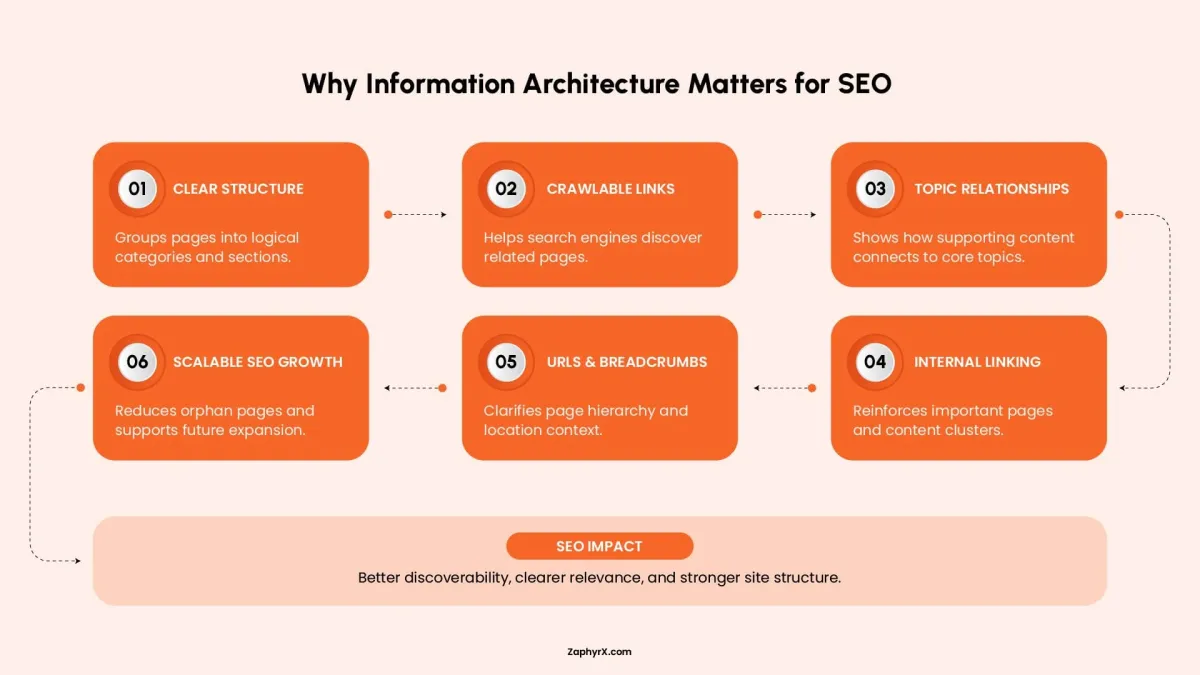
Information architecture supports SEO by creating a website structure that helps search engines discover content, understand relationships between pages, and identify the depth of expertise a website covers on a topic.
Search engines analyze how pages connect, how content is organized, and which sections appear to provide useful information about a subject. A clear information architecture creates stronger signals about website topics while also improving how users discover and navigate content.
It Improves Crawling and Internal Link Discovery
Internal links help search engines find pages and understand how content is connected. Google recommends using crawlable links with descriptive anchor text because links provide context about the destination page. A well-planned architecture creates natural linking paths between related content.
For example, a UI/UX design service page may link to supporting resources about user research, wireframing, usability testing, and information architecture. Those supporting pages can then link back to the broader service page, creating a connected topic structure. This helps search engines discover deeper pages while also distributing internal authority throughout the website.
It Creates Clear Topic Relationships
Search engines increasingly rely on context to understand what a website covers. A collection of related pages organized under a clear structure provides stronger signals than disconnected articles published without relationships.
For example:
UI/UX Design
- User Research
- Information Architecture
- Wireframing
- Interaction Design
- Usability Testing
This structure shows that the website does not only mention UI/UX design once, it provides supporting information across multiple related areas. For users, this creates a logical learning path. For search engines, it creates clearer connections between related content.
It Supports Stronger Internal Linking Strategies
Many websites create content without considering how pages connect after publication. Over time, this creates isolated pages that receive little internal attention. Information architecture helps define linking relationships before content is published. A B2B website may connect:
- Core service pages with industry solutions
- Product pages with comparison content
- Blog articles with related guides
- Case studies with relevant service pages
These relationships help users continue their journey while giving search engines additional context about important pages.
It Improves URL Structure and Website Understanding
A logical URL structure reinforces the relationship between pages.
For example: /services/ui-ux-design/information-architecture/
communicates more meaning than: /solutions/page-23/
Descriptive URLs help users understand where they are within a website and make the overall structure easier to manage as the site grows.
It Strengthens Breadcrumb Navigation
Breadcrumbs show a page’s position within the website hierarchy and help users move between broader and more specific sections.
Example: Home → Services → UI/UX Design → Information Architecture
Breadcrumbs are especially valuable for large websites with multiple service categories, ecommerce products, documentation libraries, or resource sections. They also provide additional structural context that search engines can use when interpreting page relationships.
It Reduces Orphan Pages
An orphan page is a page that has little or no meaningful internal connection to the rest of the website. These pages may still be indexed, but they are harder for users to discover and harder for search engines to understand within the broader website structure. A strong information architecture reduces orphan pages by ensuring every important page belongs to a clear category and has relevant internal connections.
It Makes SEO More Scalable
Without a clear architecture, websites often grow by adding new pages wherever space is available. Over time, this creates confusing navigation, duplicate topics, and disconnected content. Information architecture provides a framework for future growth. New articles, services, products, and resources can be placed within existing categories and topic clusters instead of creating new sections unnecessarily. A strong IA system allows a website to expand while maintaining clarity for both users and search engines.
What Are the Most Common Information Architecture Mistakes?
Most information architecture problems happen because websites are organized around the way a company thinks instead of the way users think. A structure that makes sense to employees may confuse visitors and make important content harder to find.
Search engines analyze how pages connect, how content is organized, and which sections appear to provide useful information about a subject. A clear information architecture creates stronger signals about website topics while also improving how users discover and navigate content.
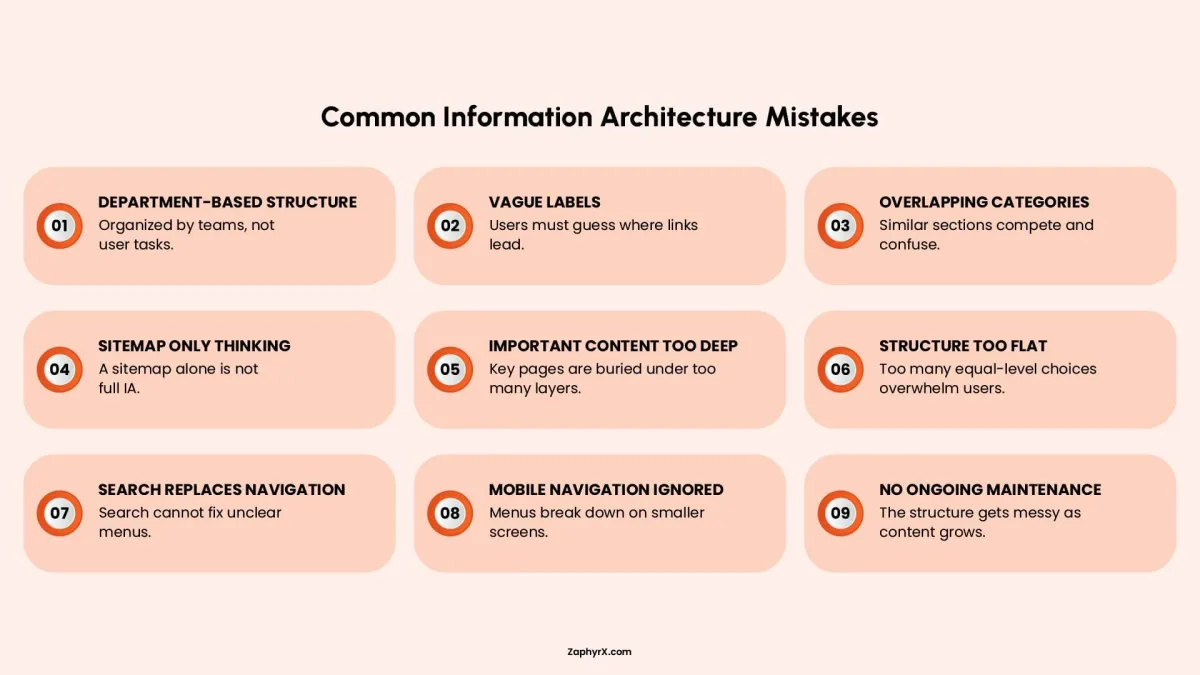
Organizing the Website Around Departments
Many companies organize their websites according to their internal teams. While this reflects the business, it rarely reflects the way visitors look for information.
Someone looking for website maintenance should not have to decide whether it belongs under Engineering, Digital Marketing, Client Services, or Operations. Most people simply want to find the service they need. A better approach is to organize content around tasks, products, services, or topics that users already understand.
Using Vague Navigation Labels
Navigation labels should tell people what they will find before they click. General terms such as Explore, Discover, Solutions, or Resources often leave too much room for interpretation.Choose labels that describe the content clearly. Visitors should not have to guess where a menu item leads.
Creating Overlapping Categories
Each category should have a clear purpose. When several categories appear to describe the same content, people cannot tell which one is correct. For example, these labels are difficult to distinguish:
- Web Solutions
- Digital Solutions
- Technology Solutions
- Development Solutions
If visitors are unsure where to click, content editors will often be unsure where to place new pages. Over time, this creates duplicate content and an inconsistent structure.
Treating the Sitemap as the Entire Information Architecture
A sitemap shows how pages relate to one another, but it is only one part of information architecture. Information architecture also includes navigation labels, content categories, search, filters, internal links, metadata, and the rules used to organize content as the website grows. The sitemap shows the structure. Information architecture explains how the structure works.
Hiding Important Content Too Deeply
Every level in the navigation should help users narrow their choices. If a page exists only to lead to another page, it may not be necessary. Important content should be easy to reach. Visitors should not have to click through several broad overview pages before finding the information they need.
Making the Structure Too Flat
Adding every page to a single menu does not make a website easier to use. It often has the opposite effect. When too many options appear at the same level, people must read each one before making a choice. Clear categories reduce the number of options people need to consider at each step.
Relying on Search Instead of Navigation
Search and navigation serve different purposes. Search helps people who already know what they want and can describe it using the right words. Navigation helps people explore, compare options, and understand what the website offers. A good website supports both. Search should not compensate for a navigation system that is difficult to use.
Ignoring Mobile Navigation
A navigation system that works well on a large screen may become difficult to use on a phone. Review the experience on mobile devices by checking:
- Menu length
- Expand and collapse behavior
- Category visibility
- Back navigation
- Touch target size
- Breadcrumbs
- Amount of scrolling required
Visitors should be able to move through the website without losing their place or struggling to reach important pages.
Using Internal Language
Employees often use product names, abbreviations, and technical terms that are unfamiliar to customers. Navigation should use the words that visitors already understand. Useful sources include customer interviews, sales calls, support requests, search queries, and card sorting studies. When labels match the language users expect, navigation becomes easier to understand.
Failing to Maintain the Structure
Information architecture needs regular review. As new pages are added, categories can become crowded, labels may become inconsistent, and duplicate content can appear. Review the structure several times each year to remove outdated content, improve naming, and keep navigation clear. Regular maintenance helps the website remain organized as it grows.
Build the Structure Before Polishing the Interface
Information architecture shapes how visitors understand a website before colors, animations, and visual details influence their experience.
When content is logically grouped, labels communicate clearly, and navigation follows real user goals, the website becomes easier to explore and easier to trust. Visitors spend less effort deciding where to go and more time evaluating the information that matters. A better website user experience does not begin with the interface. It begins with the decisions behind the interface.
ZAPHYRX brings UI/UX strategy, information architecture, and web development together to create websites that are structured around user needs and business goals.
Ready to Improve Your Google Presence?
If your Google Business Profile is not bringing results or feels hard to manage, ZAPHYRX can help you fix and improve it. We set it up properly, make sure it shows up in the right searches, and structure it so customers are more likely to call, visit, or reach out.
Frequently Asked Questions
Website information architecture is the system used to organize, label, connect, and present content. It includes hierarchy, categories, navigation, taxonomy, search, breadcrumbs, and internal links. Its purpose is to help visitors understand the website and locate relevant information with less effort.
Information architecture improves website user experience by making navigation more predictable, reducing cognitive effort, clarifying page relationships, and helping people find information. Consistent navigation also improves accessibility by helping users recognize where repeated controls and content appear across pages.
Information architecture is the complete system behind content organization and navigation. A sitemap is a visual document showing pages and hierarchical relationships. Nielsen Norman Group describes a sitemap as one deliverable within the broader information-architecture process.
No. Information architecture defines how information is organized, labeled, and related. Navigation is the visible system of menus, links, breadcrumbs, and controls that exposes parts of the architecture to users.
The main components are content organization, hierarchy, taxonomy, labeling, navigation, search, and page relationships. These components work together to support findability, discoverability, orientation, and task completion.
Information architecture can be tested through card sorting, tree testing, usability testing, search-log analysis, and click-path analysis. Card sorting explores how users group information, while tree testing measures whether they can find items within a proposed hierarchy.
Information architecture supports SEO by improving crawlable internal links, content relationships, URL clarity, breadcrumbs, and page discoverability. Google uses links to find pages and interpret relevance, making a clear internal structure valuable for both users and search engines.
Review the architecture whenever products, services, audiences, or content categories change significantly. Larger websites should also conduct scheduled audits to identify duplicate categories, outdated pages, broken pathways, orphan content, and inconsistent terminology.